A Premiere Pro alternative that runs in the browser
cutvid is a real non-linear editor in a tab: timeline, ripple trim, nested sequences, keyframes, transitions, titles, an audio chain and an MP4 at the end. It is free, with no install and no account, and the video never leaves the machine.
What carries over from Premiere
Most of what a Premiere edit is made of is here under the same names, because the ideas are the medium’s rather than one application’s.
- Insert and overwrite
- A clip goes between what is there, or over it. Positions are derived from the clips, so nothing drifts.
- Razor, ripple and roll
- Split at a frame; trim an edge and let everything after follow, or hold it still.
- Sync-locked tracks
- An insert on the picture moves the sound by the same frames.
- Nested sequences
- A sequence is a clip inside another, and takes a transition on it, into it and inside it.
- Keyframes
- Position, scale, rotation about an anchor, skew, crop, opacity and blend all take keyframes, in lanes under the clip.
- Transitions and animations
- 32 transitions, 13 entrances and 10 loops work on any picture layer, in, during and out.
- An audio chain per clip
- High-pass, 3 bands of EQ, denoise, a gate, a compressor, a de-esser, a notch, echo and room.
- Markers, linked A/V, a gap finder
- Name a moment; keep the halves of a clip together; find the one-frame gap that should not be there.
What is different on purpose
The file never moves. Media and projects sit in the browser’s own storage on the machine that opened them, and an export is written straight to disk by the tab that rendered it. There is no upload step to wait through and no copy of the footage on somebody else’s disk.
There is no install and no subscription. The address is the application, and it can be installed to work offline.
Every edit is a command on one bus, which is why the interface and a script are the same thing here. The scripting page has the rest.
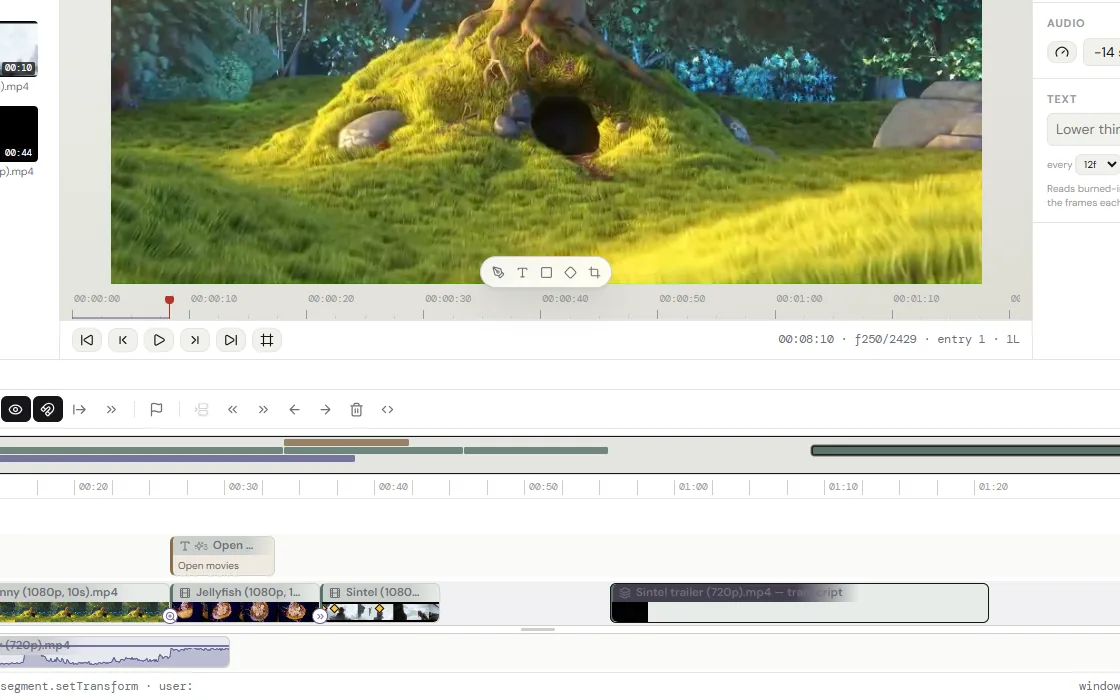

cutvid and Premiere Pro, side by side
| cutvid | Premiere Pro | |
|---|---|---|
| Price | Free | Subscription |
| Install | None: a browser tab | Desktop application, Windows and macOS |
| Where the footage goes | Stays on the machine | Stays on the machine |
| Timeline | Ripple, roll, razor, nests, sync lock | Yes, and deeper |
| Export | MP4, MOV, MKV and WebM; sound as M4A, Opus or WAV | Most professional codecs, via Media Encoder |
| Color | LUTs and an effect rail | Lumetri, scopes, curves, secondaries |
| Motion graphics | Titles, shapes, paths, keyframes | Properties and Graphics Templates panels, After Effects link |
| Team features | None: a project is a file | Team Projects, Frame.io |
| Scriptable | window.editorAgent, documented | ExtendScript / UXP |
Where Premiere is still the answer
A delivery that has to be ProRes or DNxHD, a grade that needs scopes and secondaries, and a cut that has to move between editors or between Premiere and After Effects all still call for Premiere. So do multi-camera work and anything that depends on a plugin somebody else wrote.
The rest of what cutvid does not do:
- Export is H.264 in MP4, MOV or MKV, VP9 in WebM, or the audio alone as M4A, Opus or WAV. No ProRes, no DNxHD, no H.265 out, no image sequences.
- No team features: no cloud project, no review link, no comments, no shared library. A project lives in one browser and moves as a file.
- No stock library and nothing generative: no stock clips, no music bed, no AI b-roll, no generative fill.
- No third-party plugins: no OpenFX, no VST, no motion-graphics templates from another app.
- Color is LUTs and the effect rail, not scopes, curves and secondaries. A .cube grades a clip; there is no vectorscope to grade against.
- It runs in Chrome, Edge and the other Chromium browsers, and in Firefox, where it draws with WebGL2. Safari is not checked yet.
- It runs in a tab, on one machine. A long 4K timeline is heavier here than in a native application on the same computer.
What a first hour looks like
Open the editor, drop a file on the bin, and cut. The file is copied into the browser’s own storage on this machine, known by its hash, and a lighter proxy is built for playback while the export reads the original.
Transcribe a clip and the words become a way to cut it: strike a sentence in the transcript and the picture and the sound follow. Captions are written on the timeline and leave as an .srt beside the file.
Questions
- Is it really free?
- Yes. There is no account, no trial and no paid tier. It runs on the machine that opens it, so there is nothing to meter.
- Does it upload my video?
- No. Media and projects are held in the browser’s own storage, the render happens in the tab, and the file is written straight to disk.
- Can it open a Premiere project?
- No, it does not read .prproj files. A cut has to be rebuilt, though media relinks by content hash once the files are in the bin.
- Is there a watermark?
- No. The export is the picture, at the size and rate asked for.
- Does it work offline?
- Yes, once installed. The app keeps a copy of itself and the projects are already local.
Open it and cut something.
No account, no install, nothing uploaded.